
Access and Use the Panorama DocHub
1. Hover over the menu icon at the top left of the Panorama screen

2. Click on DocHub

ℹ️ This DocHub is a personal file repository that you can use to store documents that you would like to check for accessibility. You can also share files and folders in your DocHub with other users.
3. To add new files to the DocHub, click on Upload

4. Select a file from your computer
5. Note the icon at the top-left of the newly uploaded document indicating that the filed is being checked for accessibility.

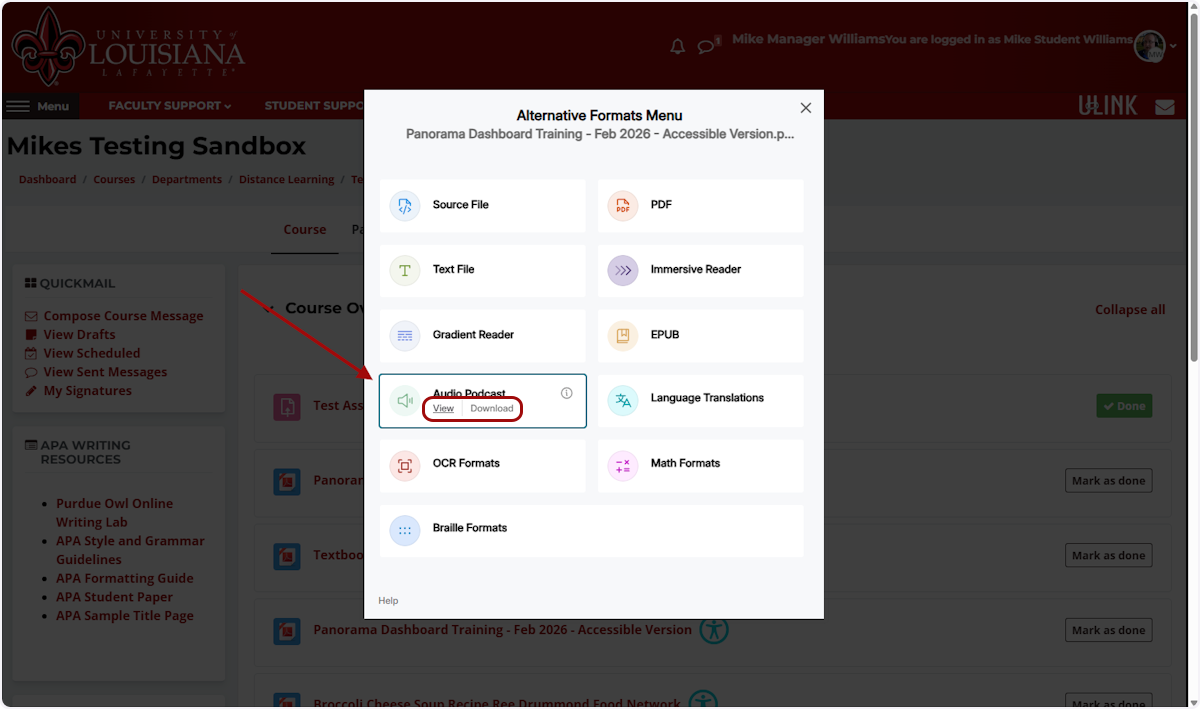
6. Once processing is complete, click on the accessibility icon (face) on the file card to open the Alternative Formats Menu

2. Hover your mouse over an alternate format, and click View or Download to access alternative formats for your file.
Fix Accessibility Issues with Panorama DocHub
1. Click on Accessibility Report…

2. Review accessibility issues flagged by Panorama...

3. Click on Learn more...

4. Click the "How To Fix" and "What This Means" tabs to learn more about the accessibility issue that has been flagged and how you can fix the issue.

5. Click Back when done reviewing the issue

6. Click on Fix Issue button (if visible) next to any issue to remediate that issue directly in Panorama

7. Follow Panorama's guidance to remediate the issue...

8. Click on Add Fix. You will be taken automatically to the next issue in the list.

9. Once you have applied fixes to all possible issues in the list, click on Apply Fixes...

# Alternative Format Descriptions
Source File: View the document in its original format, suitable for download viewing.
PDF: View the document in PDF format, suitable for both online and download viewing.
Text File: View the document in a pure text format without any formatting styles, suitable for both online and download viewing.
Immersive Reader: Allows for customizations to text preferences, grammar options, and reading preferences while following along with the audio playback.
Gradient Reader: Enhances visual word recognition when reading by providing a guiding color gradient.
EPUB: View the document in the ebook format, suitable for any ebook reader application.
Braille: View the document in the braille grade 2 format, suitable for download viewing (a braille reader is required).
Audio Podcast: Audio playback for documents, suitable for both online and download listening.
Enhanced HTML: HTML documents can be displayed in a dedicated tab to customize the appearance of the document using the Website Accessibility tool.
OCR: Convert images with text into machine-encoded text that can be searched and read by screen readers.